Focus 2026.5 – Brand Complete, Search Supercharged, and Built for You!

Focus 2026.5 is here: The Rebrand is Complete, Omni Search is Better Than Ever, and Your Feedback Shaped This Release!
May's release wraps up one of the biggest transformations Focus has ever been through. The rebrand is complete, the platform looks and feels like one cohesive product from top to bottom, search has been completely reimagined with Omni Search V2.0, and a wave of customer-driven improvements have landed across every major screen. Let's get into it!
⭐ Highlights
- Rebrand Complete – Clean lines, full Subphonic brand alignment, consistent experience everywhere you look.
- Usability Overhaul – Same layout, same controls, same patterns across every screen in the platform.
- Easier to do the things you do every day!
- Omni Search V2.0 – Search that actually thinks ahead. Auto-search on type, smarter linking, better date pickers, and more options than ever.
- Customer Feedback Wins – XLS export from every grid, pinned headers, pinned playback bars, and effortless horizontal scrolling.
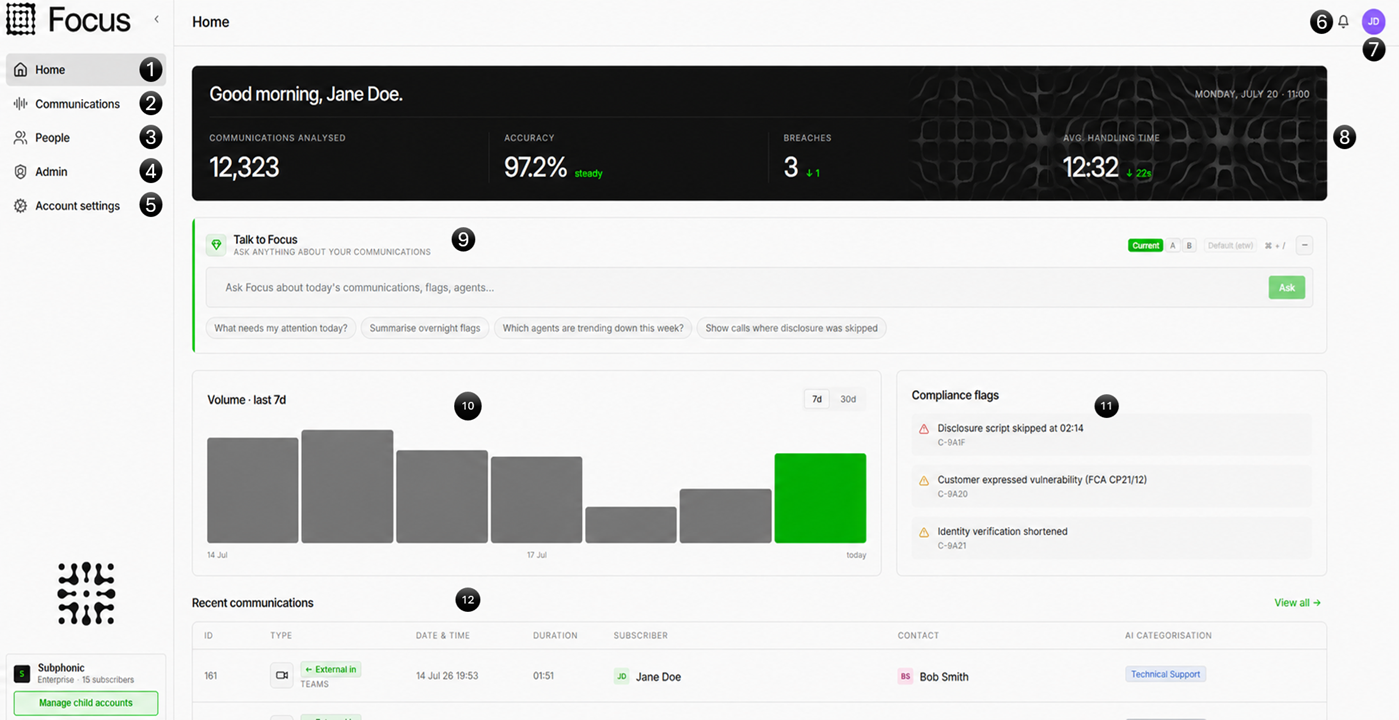
- Talk to Focus (Beta) – Ask Focus a question and get an answer, directly in the platform.
- Provisioning Improvements – Full UI-driven Teams deployment, Entra sync setup in the portal, and Sync Now on demand.
- Full home page redesign - More hepful home screen and ready for Talk to focus!
- Way better and easy to use admin screens - The options have been cleaned up and made easier to use than ever.
🎨 Rebrand: Complete.
We started the rebrand in 2026.1, pushed it further in 2026.4, and now — it's done. Every screen, every component, every corner of the platform has been brought into full Subphonic brand alignment.
This wasn't just a coat of paint. We went through the entire platform and applied the same design principles throughout: clean lines, consistent spacing, clear hierarchy, and the Focus identity you'd expect from a modern compliance platform.
- Full brand alignment across every page and component
- Clean, consistent typography and colour throughout
- Polished iconography and visual language from top to bottom
- No more legacy holdovers — what you see is the finished product
The platform now looks exactly the way it should. We're very proud of this one.
🧩 Usability Overhaul: One Platform, One Experience
Alongside the visual rebrand, we took a long hard look at how every screen in Focus behaves — and made sure they all behave the same way.
Previously, different areas of the platform had developed independently, meaning controls, buttons, grids, and lock indicators could feel slightly different depending on where you were. That's gone.
- Consistent lock indicators — The same lock icon and behaviour appears on every screen where it's relevant. No surprises.
- Standardised action buttons — Primary actions, secondary actions, and destructive actions now use the same layout, position, and style everywhere.
- Unified grid patterns — Every data grid across the platform follows the same layout rules: same column controls, same pagination, same interactions.
- Predictable page actions — If you know how to use one screen, you know how to use them all.
- Groups made simple — Groups have been redesigned to be much easier to understand and work with. Clearer membership views, more intuitive management, and less guesswork about what a group actually controls.
- Reports that show their work — The reports screen now shows you exactly which reports are running and their current status. You can also adjust schedules directly from the reports list, without having to dig into individual report settings.
- Redesigned right-click menus — Context menus have been rebuilt from the ground up. Every menu is fully context-aware, showing only the actions that are relevant to what you've right-clicked. Less noise, faster navigation.
This kind of deep consistency is something that's hard to call out in a release note, but it's the sort of thing that makes a product feel genuinely polished. We think you'll notice the difference.
🔍 Omni Search V2.0: Search That Thinks Ahead
Omni Search was already one of the most powerful features in Focus. In 2026.5, we've rebuilt it to be even smarter and even faster.
- Auto-search on type — No need to hit enter. Results start appearing as you type, so you get to the right place faster.
- Smarter sub-item linking — Search results now link directly to the relevant sub-item within a record, not just the top-level entry. Find a call and jump straight to the transcript, tag, or note you were looking for.
- Improved date pickers — Date range selection has been redesigned to be faster and more intuitive — useful especially in compliance workflows where date accuracy matters.
- More search options — We've expanded the set of filterable fields and search parameters, so you can narrow down results without leaving the search bar.
- Recent searches — Your recent searches are automatically saved, and any of them can be converted to a favourite with a single click. Build up your go-to searches without any extra effort.
- Everything is better — Performance, result relevance, visual clarity. If you haven't tried Omni Search since 2026.1, give it another go — it's a different experience.
📋 Customer Feedback Improvements
A big part of this release came directly from customer feedback, and we want to call that out. These changes were driven by the people using Focus every day.
- XLS export from every grid — You asked, we delivered. Every data grid in the platform now has a direct XLS export option. No workarounds, no copy-pasting, just clean data in your spreadsheet tool of choice.
- Pinned headers — Column headers now stay pinned as you scroll down through long lists. No more losing track of which column is which halfway down a large dataset.
- Pinned playback bar — The audio playback bar stays pinned while you scroll through a transcript or call record, so you can read and listen without constantly jumping back to the top.
- Left/right scroll — Wide grids now support simple horizontal scrolling without awkward layout shifts. Scroll left and right as naturally as you scroll up and down.
🤖 Talk to Focus — Beta
Ask Focus a question, get an answer. We're launching Talk to Focus in beta — a conversational AI assistant built directly into the platform that can help you navigate, find records, understand your data, and get things done faster.
This is early access, so expect it to grow quickly. We'd love your feedback on what's useful and where it can go further.
⚙️ Provisioning Improvements
Setting up and managing Focus just got a lot simpler. We've invested heavily in making provisioning a fully UI-driven experience — no PowerShell required.
- Entra Sync UI Setup — The full Entra sync configuration can now be completed through the Focus portal. No more manual steps outside the product to get directory sync running.
- Sync Now — Made a change and want it reflected immediately? Hit Sync Now to trigger a manual sync on demand, without waiting for the next scheduled cycle.
- Full UI-Driven Teams Deployment Workflow — Deploying the Teams recording bot is now entirely guided through the Focus portal. The full workflow — from setup to validation — is handled in the UI. The PowerShell scripts are no longer needed for standard deployments.
⚠️ Breaking Changes
We don't make breaking changes lightly, and we want to be upfront about what's changed in this release so you can plan accordingly.
- External is now called Contacts — The "External" category throughout Focus has been renamed to "Contacts". This better reflects how external parties are used across compliance workflows and aligns with wider platform terminology. You may need to update any saved searches, reports, or integrations that reference the old name.
- New Partner User Level — We've introduced a new partner user level with its own distinct permissions. If you manage child accounts then we can talk you over the updates but they should make everything easier.
- Changes to Super User Access — Super user permissions have been tightened and realigned. Review your super user assignments to confirm they still reflect your intended access model.
- Subscriber Import Wizard — The subscriber import wizard is temporarily unavailable in this release while we rebuild it to support the new contact and user structures. It will be back soon. If you need to bulk import subscribers in the meantime, please reach out to support and we'll assist directly.
🔧 Quality of Life
Alongside the headliners, we've shipped the usual wave of smaller polish items, performance improvements, and refinements throughout the platform. These are the details that don't make headlines but add up to a much smoother day-to-day experience.
Focus 2026.5 feels like a milestone. The rebrand is complete, the platform is consistent, search is smarter than ever, and real customer feedback has shaped the product in tangible ways. As always — thank you to everyone who takes the time to tell us what works and what could be better. It makes Focus what it is.
More to come. 🔊