Integrations
Your data is and always will be your data, and even though the Focus user interface is designed to be simple to use and very powerful, we understand that you may need to send or link data into other systems.
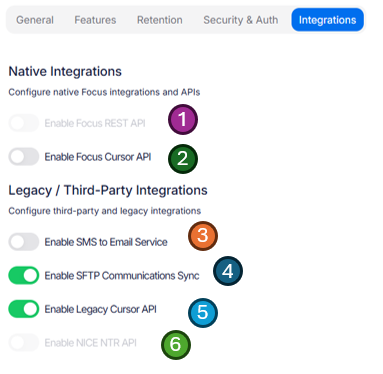
- Native Focus REST API
- Native Cursor Synchronization API
- Push API (Transcript Hook)
- SMS to Email
- SFTP Access
- Legacy Cursor API
- NICE NTR/NTX API
If any of the below options are missing or grayed out or unavailable, they may not yet be enabled on your account. Please contact support and we will be happy to help.
Native Focus REST API
The Native Focus API lets you interact with your data stored in Focus with a full REST API. This includes options like:
- Search for communications
- List current endpoints
- Update users names or metadata
- Disable users when they leave
- And much more...
Once enabled on your account A full integration guide can be found under the integrations section of the help page.
Native Cursor Synchronization API
The Focus platform offers a robust Cursor API designed to streamline data synchronization between Focus and third-party systems. Using a Cursor API provides several key benefits:
- Efficient Data Synchronization: Incrementally transfer only new or updated records since your last request, reducing bandwidth and improving performance with large datasets.
- Reliability: By tracking the position of your last successful sync, the Cursor API helps prevent data loss or duplication, ensuring integrations remain consistent and reliable.
- Scalability: Easily handle increasing volumes of information as your data grows, without overloading your systems.
- Simplicity: Abstracts away complex synchronization logic, making it easier for developers to integrate Focus with other platforms quickly and with minimal code.
- Real-Time Updates: For applications that require up-to-date information, the Cursor API allows for near real-time data syncing, keeping your systems in sync with Focus at all times.
- Flexibility: In addition to simple synchronization, the full API allows for advanced interactions, such as downloading or updating specific data within Focus, supporting a wide range of integration scenarios.
Native Cursor Setup

To enable the Native Cursor API on your account simple toggle the switch from within the Focus portal. Currently the API key must be obtained via a support ticket, this will become self service via the portal as soon as possible.
Once completed you can find a full integration guide can be found under the integrations section of the help page.
Push API (Transcript Hook)
Push API sends a webhook payload when transcript processing completes. This is useful when you want event-driven processing without polling.
Push API is for low-volume customers only.
Recommended rate limit: 10 requests per hour.
For higher volume or guaranteed bulk synchronization, use the Native Cursor Synchronization API and/or Native Focus REST API.
Once configured, Focus posts transcript completion payloads to your endpoint. A full setup and workflow guide is available here: Push API integration guide.
SMS to Email
SMS to Email can provide a copy of each SMS via email. Each email is sent to a specific address and is base64 encoded. This can be used to provide an archive copy of SMS messages to a 3rd party system.
SMS to Email Setup
SMS to Email can be enabled via the Focus portal.
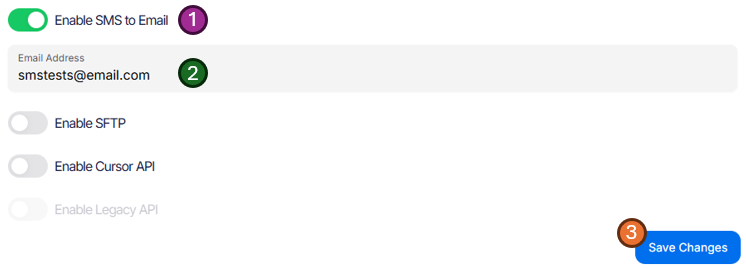
- Turn on the toggle for SMS to Email
- Add the email you would like the Email sent to
- Press Save Changes
Once completed you will start receiving each SMS as an email. A full integration guide with examples, headers and screenshots can be found under the integrations section of this help page.
SFTP Communications Sync
SFTP Setup
SFTP sync provides access to your communications and metadata via an SFTP client. If enabled on your account, SFTP access can be turned on via the accounts screen.
SFTP is considered a legacy integration, it is recommend that the Focus API is used to access recordings instead of SFTP as you will be able to get full metadata and extra data like transcripts, comments and tags. SFTP download only provides access in the described format.
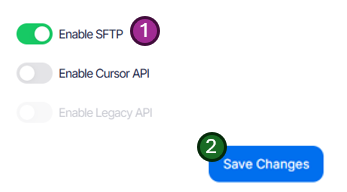
- Select the Enable SFTP toggle.
- Press Save Changes
A new SFTP Username and Password will be generated and shown in a popup. Copy this information using the copy buttons.
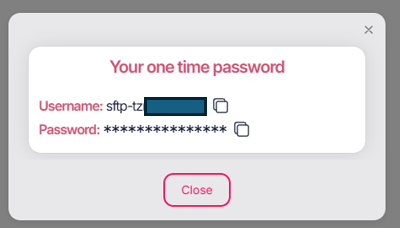
Make sure you save this password somewhere safe and secure, the password will only be diplayed once. If the SFTP is disable and then re-enabled, the password will be reset and be shown again.
Once completed you are ready to start using the SFTP service. A full SFTP integration guide can be found under the integrations section of this help page.
NICE NRT/NTX API
NICE NTR Setup
The NICE NTR/NTX API provides a specific Focus endpoint for use by the NICE NTR GET API. This is only applicable to customers using NICE NTR and must be configured by NICE or your NICE support team.

- Select the Enable NICE NTR API toggle.
- Press Save Changes
Currently the API Username and Password must be obtained via a support ticket, this will become self service via the portal as soon as possible.
Once enabled and you have your authentication information, you are ready to start using the NICE GET API. A full NICE NTR integration guide can be found under the integrations section of this help page.
Legacy Cursor API
Our Legacy Cursor API can still be used by customers who have already integrated to this, however it is missing some of the advanced options available when using the full native Focus API or the updated Cursor Synchronization API. If you would like to look to migration or upgrade and would like further information or to clarify anything regarding this API, please contact support.
Other
Focus has a full workflow system build into it! Want to send your data to a 3rd party CRM, get an email every time a member of staff starts talking about a competitor or simply push a summery or each communication into Slack?
Simple...Below is just a quick example of the current integration used within the platform:
- Simple export:
- Google Sheets
- Excel files
- Chat applications:
- Slack
- Teams chat
- Help desks or tickets systems:
- Jira
- Linear
- CRMs
- ClickUp
- HubSpot
- MIcrosoft Dynamics
- Salesforce
- Zendesk
- Freshdesk
- File stores
- S3 Bucket
- Azure Blob
- Custom
- Custom HTTP POST/GET
- More...
Get in touch with your use case and we would be happy to help.