Security & Auth
IP Restrictions
If you wish to restrict users (both SSO and local) from being able to login to Focus, unless they are accessing the platform from a specific IP address, you can set this whitelist on the Security and Auth section of the accounts page.
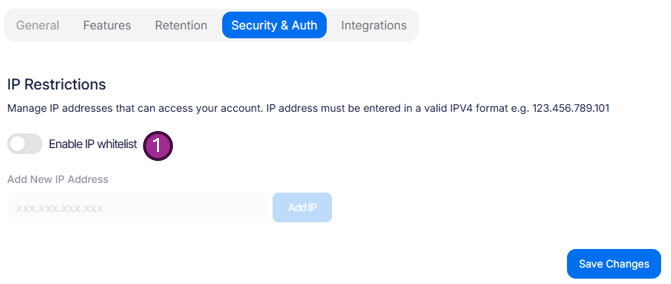
To enable the whitelist and start adding allowed IP address simply toggle the Enable IP whitelist (1) option.
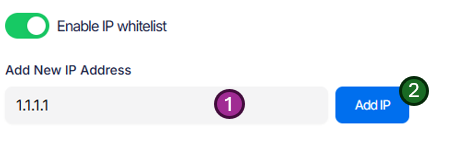
Once enabled you will be able to add as many IPs as require access.
Make sure you have checked that your current IP (or if you use a VPN, the VPN IP) is included in the range you have added, if not you will no longer be able to access the account. You can check your current IP address via a simple search or try this website: https://www.showmyip.com/
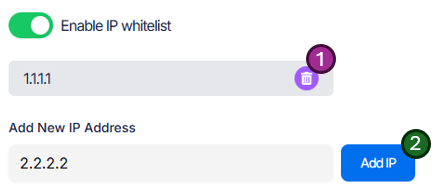
Once you have added an IP address, you can add more via the same method (2) or remove an already active IP address via the bin icon (1).
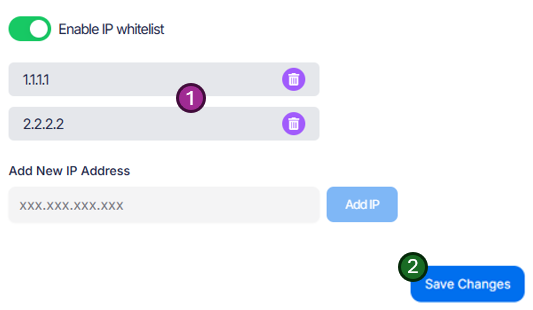
Continue adding IPs until you have added all addresses your users may use (1) (or your VPN address), press Save Changes (2)
Before you press Save Changes (2), double check your current IP address is on the allowed list.
Two Factor Authentication (2FA)
Two factor authentication is mandatory for all local Focus users.
Security is very important and as such the ability to disable 2FA has been removed from this section of the portal. 2FA is now mandatory for any local access to the Focus platform.